
Report Lost & Stolen Nol Card
Searching about how to recover your stolen NOL card but not knowing how to do this? Report Lost & Stolen NOL Card: Recovering everything will be discussed in this post; just keep reading. It can be stressful to lose your NOL card, particularly if there is still money on it. Fortunately, the Roads and Transport Authority (RTA) enables you to securely retrieve your money if your card is registered.
You can get your money back by reporting a lost or stolen NOL card to the official RTA. Report your lost or stolen NOL card to RTA as soon as you can. The RTA portal, the NOL pay app, calling 800-9090, or going to the customer service center are all ways to report a misplaced NOL card. After the NOL lost report is submitted, your card will be cancelled. You can apply for a refund or balance transfer and replace the NOL card after the card is deactivated.
Report the theft or loss of your Nol card.
If your NOL card disappears, you must act right away. Quick action reduces financial risk because a lost or stolen card can still be used by anyone until it is formally blocked.
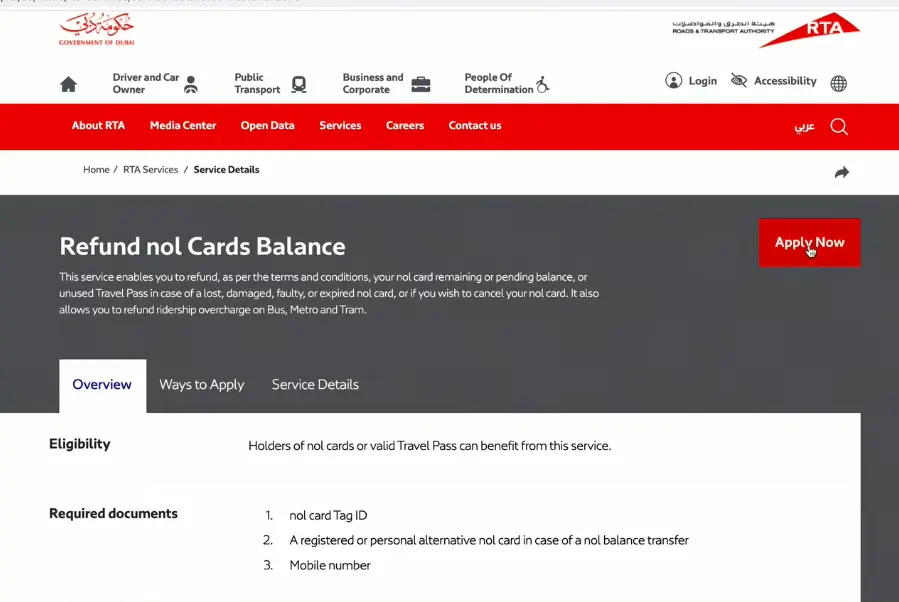
Report the loss as soon as possible.
As soon as you discover your card is missing, call 800 90 90 to reach RTA Customer Service. This is the official 24-hour hotline for problems with Nol cards. The agent will assist you in blocking your card so that it cannot be used again. Additionally, you can use one of two methods to report the card loss online.
- The RTAs official website.
- The RTA Dubai App or the Nol Pay App.
- You can apply for refunds digitally and report online with ease.
Who Can Get Their Nol Card Balance Back?
Not every Nol card can be recovered or refunded. Only personalized or registered cards are eligible for balance restoration.
Refund-eligible.
- Blue Nol Cards (Personal).
- Your Emirates ID is connected to a silver or gold card.
Since these cards are registered in your name, it is possible to track down and reissue your balance.
Who is not eligible
- Silver or Gold cards that are not connected to an Emirates ID.
- Red tickets are short-term travel cards.
Regrettably, the balance cannot be retrieved if your card is not registered.
Delivery time and processing time.
The replacement card is mailed straight to your registered home address once it has been approved.
Once received:.
- Tap your new card on a Metro gate parking meter or Nol top-up machine to activate it.
- Once activated, the transferred balance will automatically appear.
Cost of lost nol card recovery
| Type | Fee |
| Card replacement fee | AED 70 |
| Balance transfer | Free |
Alternative Methods to Report Lost or Stolen Nol Cards.
The RTA provides a number of practical options if you would rather receive help in person.
Smart RTA Kiosks
These kiosks, which are situated in well-known locations like Jumeirah Emirates Towers, Al Barsha Mall, and Deira City Centre, are open around-the-clock and let you check your balance, report a lost card, and request a refund.
Ticket offices for RTA
You can go to any of the RTA ticket offices found at the metro stations in Dubai. To submit your report to RTA employees directly, bring your Emirates ID and card information if you have them.
Protection Advice to Stop Future Losses.
Use these best practices to prevent losing your NOL balance in the future.
Set up your Nol card
Connect your Silver or Gold NOL card to your Emirates ID to personalize it. The following can be used for this.
- RTA website.
- Dubai RTA App.
- The Nol Pay app.
For just AED 30 you can register and get a refund if your card is ever lost or stolen.
Safeguard your PIN and Nol Tag ID
Your Nol tag ID and PIN code should be written down or kept in a safe location. These details are required in order to submit a refund request.
Turn on alerts for the app
Turn on notifications if you use the RTA Dubai app in order to monitor balance changes and spot anomalous activity.
Keep Your Card to Yourself
Keep your NOL card to yourself. Since each card is intended for individual use, misuse may cause refunds to be delayed if the card is misplaced.
Advice to Avoid Losing Your NOL Card.
These useful pointers can help you avoid losing your card in the future.
- To prevent loss or damage, always keep your NOL card in a safe location or protective pouch.
- In order to block your NOL card and retrieve your balance in the event that it is lost, register your card with your personal information.
- Check your NOL card balance using the official RTA app or website and keep an eye out for any unauthorized activity.
Conclusion
Finally, we think that as long as it is registered, losing your NOL card does not equate to losing your money. To safeguard your money, you must act quickly to report and block your card. RTAs’ online and offline recovery services make it simple for you to get your balance back and carry on with your trip without interruption.
The time is ideal if you haven’t already customized your Nol card. Every time you travel in Dubai, having a registered card guarantees convenience, security, and peace of mind.
FAQS Related Report Lost & Stolen Nol Card
Let’s discuss some questions that can clear your confusion.