
Nol Card Renewal
If your Nol card is about to expire, you can easily renew it online or at kiosks to make sure your trips to Dubai are relaxed, cashless, and seamless. NOL Card Renewal is very simple nowadays. Don’t let travel delays ruin your time there. Nol cards usually have a validity period, and when they expire or get damaged, they usually need to be replaced rather than having their physical cards renewed. It is possible to move the balance to a different card.
WHAT IS Nol Card Renewal
Your Nol card must be updated or have its validity extended in order for you to continue using it to pay for other services and public transportation in Dubai. It guarantees that your services, travel passes, and balance all continue to function properly.
Steps for Card Replacement/NOL Card Renewal Renewal
You have to just follow these steps to renew your NOL card. Additionally, if you want to renew your license, you renew it through RTA Driving License Renewal in Dubai.
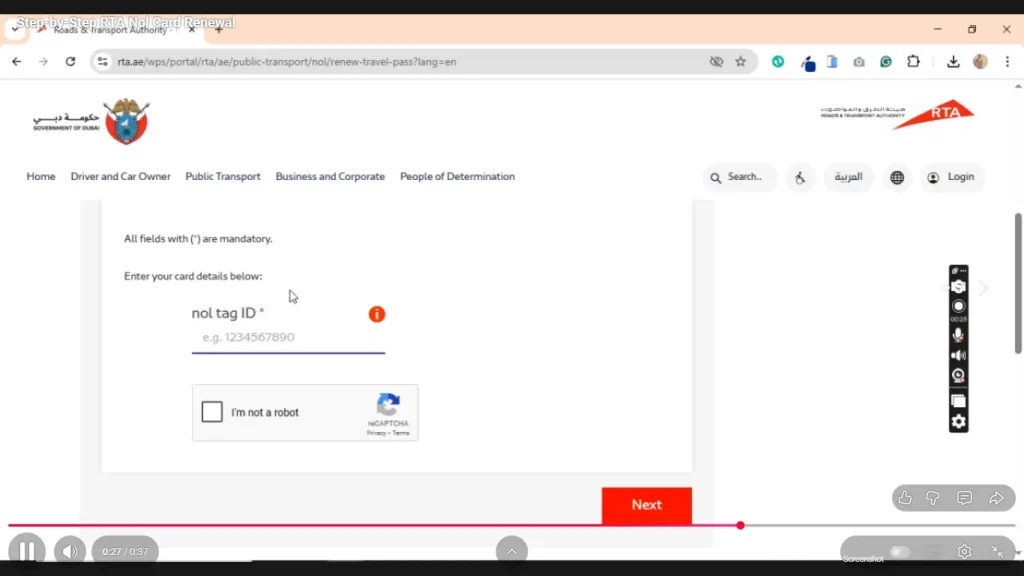
Obtain a New Nol Card
In Dubai you can obtain your new Nol card from any authorized sales location or RTA outlet. Your old or damaged card will be replaced with this new one, enabling you to conveniently continue using cashless services and public transportation.
To the new card transfer the balance
To quickly move your balance, travel passes, and card details from your old Nol card to your new one, use the Nol Pay app or stop by an RTA customer service center. This guarantees that no credit or travel benefits will be lost.
Transfer Balance Using the Nol Pay App
The process of transferring balances and renewing an app is easy and convenient for users. Take careful note of these steps.
- On your smartphone, launch the Nol Pay app.
- Open the main menu and select the More Services tab.
- To start the process of transferring the balance, choose Report Lost
- Damaged or a comparable option.
- Your balance and travel passes can be safely transferred to the new card by entering.
- Provide the required details and tag the ID of your previous card. Once you have confirmed the transfer, watch for the system to update your new card balance.
Other Pointers for Using the Nol Pay App to Transfer Balances.
Following are the methods for transferring from other pointers.
Verify the validity of the card first
Before starting the transfer, make sure that your old Nol card is still readable or active to ensure a smooth balance retrieval.
Utilize the same Emirates account or ID
When possible, please use the same account or Emirates ID linked to your previous Nol card to prevent data inconsistencies when transferring funds.
Internet access is necessary
Throughout the process keep your internet connection steady because any interruptions could result in a failed or delayed balance transfer.
Processing Time
Generally, balance transfers take effect in 24 to 48 hours depending on RTA system updates. Keep the old card once it has been confirmed. Do not discard the old Nol card until the new one has passed through your app and shown the updated balance.
Option: In-Person
If the app isn’t functioning or shows errors, go to the nearest RTA Customer Happiness Center for manual support.
Get in touch with support
You can also contact RTA’s helpline at 800-90-90 if you have any questions about balance transfers or delayed renewals.
Faqs Related Nol Card Renewal
Conclusion
You can travel through Dubai’s bus, tram, and metro systems with ease and uninterrupted service if you renew your Nol card. The Nol Pay app or RTA centers offer a quick and easy way to renew your Nol card. You can safeguard your travel passes, transfer your balance, and continue to commute throughout the city without using cash or experiencing any service outages if you renew on time.